Skip to content

DevOps

3 Helpful Commands to Fix Windows 11

If your Windows starts to crash a lot, you can try the following 3 commands to fix some common problem sources. The commands may take a while to run, but if they work, you save yourself a fresh installation of Windows.

How to Clone Dashboards in Seq

We use Seq to monitor our applications because it allows us to see all the important information at one place. Our customised dashboards help us to spot anomalies and corelate events without much effort.

Unfortunately, there is no direct way to clone a dashboard as a starting point to customise it for a different application. But with a little workaround we can get what we need, nonetheless.

Change the SSL Certificate of the Octopus Deploy Server

Renewing SSL certificates for applications we deploy with Octopus Deploy is a straightforward task. We can go to the certificate store, replace the old certificate with the new one and the next time we deploy the certificate is on the server. If we need to update the certificate for Octopus Deploy itself, we need to go through more hoops that are not as clear. Let us see what we need to do.

How to Fix the Context Menu of Windows 11

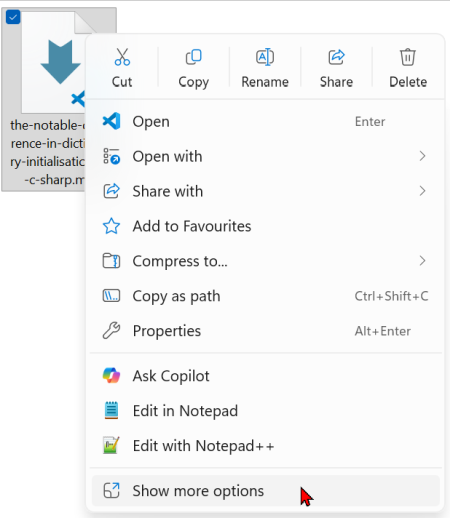
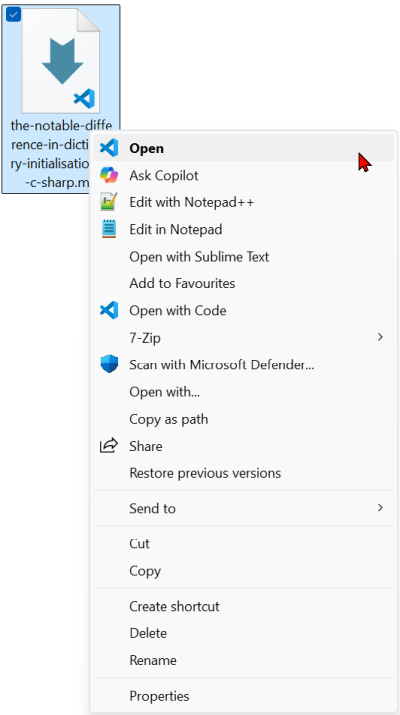
With Windows 11 came a new context menu in the file explorer. What before was a one click action, now takes us two steps:

  1. We right-click on the file to open the first context menu: The new context menu shows up.
  2. Now we need to click on "Show more options" to get the Windows 10 context menu: The old context menu with the helpful options.

So far, I accepted this extra step as the price to get all the other Windows 11 benefits. But as it turns out, this is unnecessary. We can get the old context menu back with a single entry in the registry.

Fix Permissions in Windows With takeown and icacls

In Windows, we sometimes run into files or folders we can not access, even with elevated privileges. The takeown tool helps us solve this problem by letting us take ownership of those files or directories. Once we own them, we can adjust permissions or grant access as needed.

The basic command looks like this:

takeown /f <filename or directory>

Repository Aliases in GitHub Desktop

If you have two repositories with the same name in GitHub Desktop, you have a hard time to figure out which one is which:

The two projects look the same.

This can happen when we need to work on a fork of the project and the original one at the same time or when we have a backup in a different folder where we need to check something but do not want to do the work in our main repository.