5 Things to Test With List Parameters
Whenever we have a method that accepts a list as a parameter, we should test these 5 cases to see if the method handles the input correctly:
- Null
- Empty
- One
- A few
- Many
Let us take a closer look at each of those inputs and what they can check for us. The list is not my invention, but so far, I was unable to attribute it correctly. If you know who the source was, please let me know.
Null
If we pass Null to the method, we can check if the method throws a NullReferenceException or if it handles this edge case in a more controlled way. What the correct return value or exception for this case is, depends on the context. Nevertheless, we must know how the method behaves with Null, or we figure it out on production. Therefore, test it early to prevent the nasty surprises later.
Empty
If we can pass a list, then that list could be empty. Instead of nothing as with the Null case, we now have at least a list, even when nothing is in the list. You would be surprised how many developers think about the Null case but not about the case that it could be empty. It may look the same, but the code paths differ and with that we are up to surprises in production.
One
A list with only one element works in most cases. That is usually the case the developers worked with when they wrote the method. From the testing perspective, we can use this case to make sure that the method works in its most basic way. We can see what this method should do without the distraction of multiple elements.
A few
With a handful of elements in our list we can make sure that the method keeps working when it must handle multiple elements. You would be surprised how many problems can happen if values in loops are not correctly scoped or when values are not put into the expected state.
Many
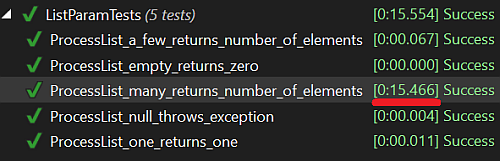
When we reach the point of many items to test, we already know that the method can handle the other cases. Now it is time to figure out what happens when we add a large number of elements. Does the method still work? Or can we see certain strange behavior that so far did not show up? Problems like Select N+1 we only notice after a few hundred elements, even if they are present all along. Increasing the elements beyond any expected amount in production can help us here to wipe out such bugs.
If we run the test, we may find that it takes far too long to finish this test and that something may be wrong with the implementation when it comes to many elements:
Conclusion
We often use lists as parameters for our methods. They are convenient and easy to use. However, they come with their own challenges, and we better test our code accordingly. If we decide not to test those cases while we develop our code, we will test it in production. And that is not the right place to figure out what we missed.