Goodbye 2025, Welcome 2026
With the end of the year just around the corner, it is time to look back and take a brief look ahead to 2026.

With the end of the year just around the corner, it is time to look back and take a brief look ahead to 2026.
There are a whole bunch of non-printable characters in ASCII like tabulator, end of medium or shift in that sometimes finds its way into a user input. This often happens when copy and pasting data from Microsoft Office.
We can find most of those special characters by copying the data from SQL Server Management Studio into Notepad++. A little visible indicator is all we need to find the special character and remove it. However, 0x00 represents NULL and has no visual indicator, what makes it uncatchable for our usual process.
Last week we got this exception that started an unprecedented hunt for a special character:
System.Xml.XmlException: '.', hexadecimal value 0x00, is an invalid character. at System.Xml.XmlConvert.VerifyCharData(String data, ExceptionType invCharExceptionType, ExceptionType invSurrogateExceptionType)
We checked, double-checked and triple-checked all the data and found nothing. We fixed a bunch of entries, but nothing changed. The exception kept showing up.
By default, ASP.NET validates the dependency injection container configuration at runtime. As a result, we only discover missing or misconfigured dependencies when the application runs. While this approach works, getting feedback at the build time would be a time saver.
As we moved from .Net Full Framework to .NET 6, we had to use the little hack of creating a AssemblyInfo.cs file and put this content into it to access the internal classes and methods from our test project:
With Windows 11 came a new context menu in the file explorer. What before was a one click action, now takes us two steps:
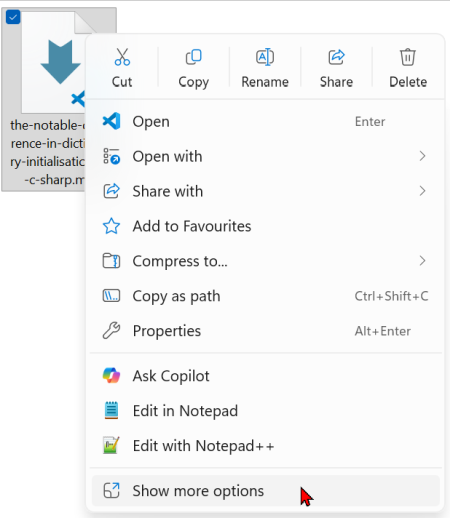
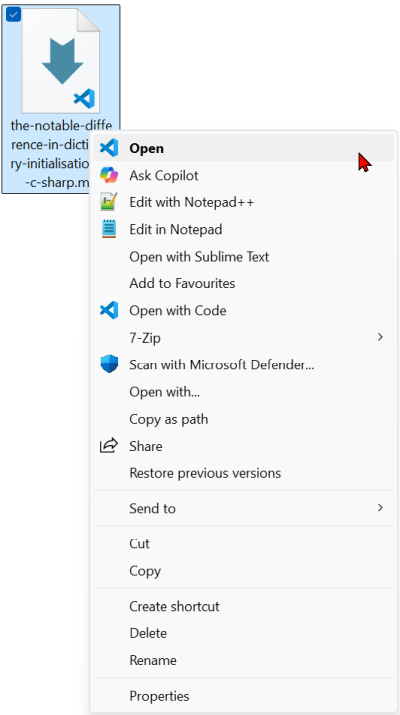
So far, I accepted this extra step as the price to get all the other Windows 11 benefits. But as it turns out, this is unnecessary. We can get the old context menu back with a single entry in the registry.
In C# we have two ways to initialise a dictionary. While both give us a dictionary in the end, there is a small but important difference when it comes to duplicated values. Let us explore the difference.
GUIDs are great for generating unique identifiers across distributed systems, since they need no centralised coordination and are globally unique. But their randomness comes with a price tag when we use them in relational databases: fragmented indexes, slower inserts, and no sense of order.
Since .NET 9 we get an out of the box solution that fixes this problem: UUID version 7. We can keep the upsides of a GUID while we can get rid of the downsides - by just using a different method to create our identifiers. Let us explore how that works.
When we want to make sure that our method only accepts values that are not null, we can write guard clauses like these on top of the method:
That works, but as you can see in this little example, this uses many more lines to check the data than it uses to do the work itself. Is there a better way to get this functionality?
A few months back I reviewed an application. It was sad to see in how little time you could create a mess that is not only hard to work with, but that can only be changed with a lot of effort. In this post we focus on one tiny little detail that can help you as a warning sign early on: having test code directly in the production code.
When we run Linux on a Docker container, we may not know what terminal application or shell currently runs. If we want to find out, we can run two commands to get an answer.