Last week I blogged about password managers and how much help they are. However, not everyone can or want to use a service like LastPass and 1Password. Today I show you how KeePass manages all your passwords on your local machine.
A year went by since I blogged about "How many of your Accounts have been Compromised in a Data Breach?". At this time there where ~4 billion usernames and passwords collected on the site "Have I been pwned?" (or short HIBP). Since then, Troy Hunt could add another 1,500,000,000 accounts to the list. That is an enormous number and shows how big the problem of “lost” usernames and passwords is.
This post should help you to minimise the effect of a data breach. They happen all the time and when you reuse your passwords, those criminals cannot only access the site with the leak, but all sites where you used the same password.
When you work in multiple teams, you quickly end up with different ideas on how the code you write should be formatted. “Tabs or spaces?” is something developer can argue for hours, have strong opinions about and are unwilling to change them. With only one setting in Visual Studio you are constantly changing it, or you end up reformatting the code. Both is annoying and not really a working solution.
Visual Studio 2017 has a new feature called EditorConfig, who addresses exactly this problem. Even better, this is not a Microsoft only approach, but an initiative by multiple vendors and projects (like JetBrains, GitHub, and many more.). You can find more details on EditorConfig.org, including examples and links to various projects using it.
If you want to check your dependencies for security vulnerabilities right in Visual Studio, then the approach with Dependency-Check and SonarQube is not good enough. In this case, you should try Audit.Net.
Welcome to the second part on Dependency-Check. Please make sure that you have read part one and got a working suppression file. Otherwise, you will get a lot of vulnerabilities reported in SonarQube.
This year I did not just attend NDC Oslo, I got the chance to contribute as a speaker to this great conference. That shift of perspective made me much more appreciative of the hard work that goes into a talk and how much it takes to stand in front of such a great and welcoming audience.
The five talks I selected for this post had an impact on me that went far beyond of being entertained for an hour. I spend a lot of time thinking about what I heard and I guess so will you. Those presentations may look as if they are at the wrong place for a tech conference, but trust me, they are as important as any technical talk. I am glad the organizers put them in. They challenge how we think, not only about the systems we use and build, but also about how we work with others and make our world a better place.
Did you ever need a little bit of randomness in a list? Not cryptographically strong randomness, just a bit of unpredictability so that not every run of your tool is the same? If so, this post offers you a simple way to shuffle your lists.
Updating Visual Studio is for most cases a non-event. However, one instance started to show JavaScript errors all over the place. Since we do not write JavaScript with this instance, we do not need to know about JavaScript errors.
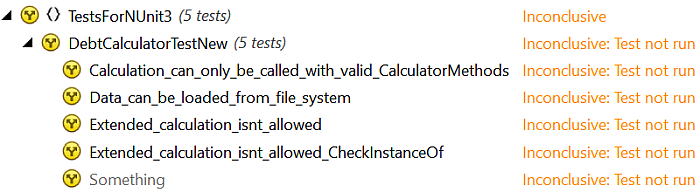
Suddenly, NUnit stopped working. We were in the middle of our refactoring, moved code around and ended up with all our tests being ignored. We rebuild the solution – no errors detected. We run our application – no problems at all. We even rebooted the machine. Everything worked except our tests: