StyleCop for .Net 5 Projects: Custom Configuration
With your StyleCop installation in place we can now look at how we can customise our StyleCop configuration.
With your StyleCop installation in place we can now look at how we can customise our StyleCop configuration.
When you work in a team it is of great importance that you all follow the same rules. Otherwise your turn a code base in a mess in no time. We settled for StyleCop because it allowed us to delegate the nitpicking of code formatting and code style to a tool that does it automatically at development time. That allows us to use the time in code reviews for the important parts.
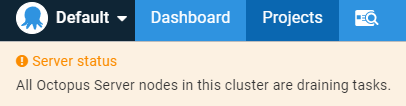
Last week I needed to reboot one of our database servers. Unfortunately, that was the one in which Octopus Deploy stores its state and I did not first stop Octopus. After the database server was back on, Octopus showed me this message:
Exporting data from SQL Server as CSV is well understood and works (most of the time). But most often when I create a CSV file, I only use it as an intermediate format that I then convert to JSON.
When you use the File Explorer (or Windows Explorer) to move files around in your repository, Git knows nothing about that action and treats your files as deleted and newly created:

As I was updating my code sample for ReportUnit, I discovered that this little helper is not being developed any longer. I wrote about ReportUnit in 2017 and used it since then to generate an overview for my test suites. Let us see if there is an alternative worth migrating to.
IntelliJ is the Java IDE from JetBrains. I used it a few times over the last months for online workshops like "Make Your Code More Testable" or the 99 minutes series of Ministry of Testing.
The Object Explorer window in SQL Server Management Studio (SSMS) is the place in which you find the databases, the tables, and all other objects inside a SQL Server. While I worked with this view for ages, I only recently found the Object Explorer Details view.
On one device I run constantly into problems with Visual Studio because my user does not have all the rights necessary to perform the tasks I have to do. The simple work around for this problem is to run Visual Studio as an administrator. While I can start Visual Studio explicit as administrator every time I open a project, but that extra step gets annoying quickly.
Cleaning up warnings in your project sometimes brings you to strange places. One of the more notable one was the depreciation warning for FxCop. We use StyleCopAnalyzers in our projects and there was no reference whatsoever to FxCop. Yet the build agent had a different opinion and showed this warning:
Warning - CA0507 - Post-build Code Analysis (FxCopCmd.exe) has been deprecated in favor of FxCop analyzers, which run during build. Refer to https://aka.ms/fxcopanalyzers to migrate to FxCop analyzers.