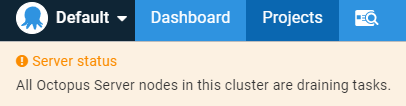
Last week I needed to reboot one of our database servers. Unfortunately, that was the one in which Octopus Deploy stores its state and I did not first stop Octopus. After the database server was back on, Octopus showed me this message:
Personal Access Tokens (PAT) for Azure DevOps have an expiration date. They can be valid for a year at most. If this expiration date comes closer, Azure DevOps sends you an email with this subject:
Azure DevOps personal access token nearing expiration
As part of our build and deploy job in the user group project we create a backup of our Azure database before we run any data migrations. If something goes wrong, we do not lose any data and can restore our cloud database to a known good state.
It would be a great opportunity to take this backup file and restore our database to the local SQL Server on our developer machines. Unfortunately, the backup tool creates a *.bacpac file and not a *.bak. Restoring a *.bacpac file needs a few additional steps and, most importantly, a different entry point in the SQL Server Management Studio to start the restore process.
Last week I run into the strangest problem with Azure DevOps since we started using it in 2015. From one day to the next, one of our local build servers took massively more time to do its work. Build steps that took 30 seconds now run for 10 minutes, some even for more than an hour.
Nothing had changed in the application or in our environment, but now we had an unusable situation. I first checked status.dev.azure.com to see if there was a known problem. All services where up and running, no news on Twitter and Google only showed problems like mine from years ago.
Last week we run into a strange problem with our build server. We use Azure DevOps with a local build machine. Everything worked as expected on Monday, yet on Tuesday without any changes on our part the CI job failed with this problem:
WARNING: Unable to find version '2.7.1' of package 'Serilog'. WARNING: Unable to find version '1.50.5' of package 'Dapper'. ...
Saving the state of a container in Docker is an anti-pattern. You should create your containers in a way that you can throw them away and start with a new one. However, there are some use-cases in which a snapshot of your current container is of great help.
One such use-case is creating a snapshot of your database container for integration testing. Instead of creating a fresh database from scratch and adding the seed data before every test run, I could do that once and reuse this known good starting point. This will save a lot of time and I get the feedback of my tests faster.
The internet moves on and the next big thing that gets dropped is the support for older versions of TLS (Transport Layer Security). If you not already have done so, now would be a good time to check that your server understands TLS 1.2 and disable the older versions of TLS on your web servers.
All of a sudden, our build agent could no longer communicate with Azure. A failed network change forced us to set a proxy server manually. While most browsers use the system proxy, the build agent did not.
Let’s Encrypt offers free SSL certificates to protect the traffic between your website and your visitors. Earlier this year I wrote about the hoops you need to jump through to use those certificates on Azure. This post shows you a way to use Let’s Encrypt certificates on your on-premises servers.
The objective of Let’s Encrypt and the ACME protocol is to make it possible to set up an HTTPS server and have it automatically obtain a browser-trusted certificate, without any human intervention. This is accomplished by running a certificate management agent on the web server.