5 Helpful Extensions for Visual Studio 2022
Visual Studio 2022 offers a lot of features, and if you use ReSharper from JetBrains, you get even more on top. Nevertheless, there is still room for more extensions that we can find in the Visual Studio Marketplace.
I find the following 5 extensions an immense help. They look boringly simply, but they allow for a highly effective workflow.
Add New File
Add New File gives us a simple, yet powerful dialog to create files. In addition to the basic feature that comes with Visual Studio, we can specify a path, and the extension creates the folders should they are missing for us:

Open Command Line
Open Command Line is especially helpful when you do more and more work on the command line. With this extension we can select a file (and not just directories) and get a terminal that opens right where the file is:

Open in Visual Studio Code
Open in Visual Studio Code is a great help when we want to use Visual Studio Code to work on JavaScript files or have other helpful extensions there that are not supported directly in Visual Studio.
We now only need to right-click on a file and get the option to open it in VS Code right there:

Trailing Whitespace Visualizer
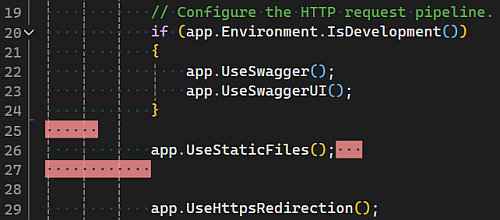
Trailing Whitespace Visualizer shows where we have whitespaces at the end of a line. That way we can spot them instantly and do not need to wait until StyleCop reports them as an error when we try to build the application:
CleanBinCommands to delete bin and obj folders
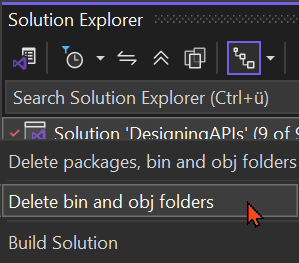
CleanBinCommands is super helpful if you use code generators. If something sticks around when we reopen Visual Studio, it may influence the code generator. With this extension we can use one click to the context menu at the solution node and remove all obj and bin folders at once:
Conclusion
The 5 extensions are simple, but do not underestimate their effectiveness. Not to search for whitespaces or cleaning the bin and obj folders takes care of annoying tasks. The improved new file dialog is great when you need to create new folders with your files, and the VS Code or command line integration makes your workflow much easier. Try it!
Next week we explore some helpful extensions for VS Code.