How to Clone Dashboards in Seq
We use Seq to monitor our applications because it allows us to see all the important information at one place. Our customised dashboards help us to spot anomalies and corelate events without much effort.
Unfortunately, there is no direct way to clone a dashboard as a starting point to customise it for a different application. But with a little workaround we can get what we need, nonetheless.
Edit as JSON
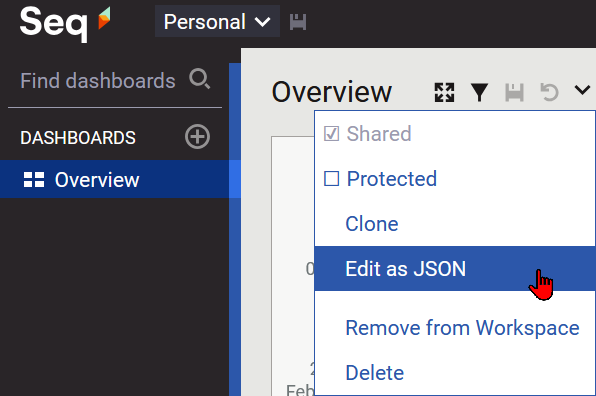
We can go to the dashboard we want to use as the basic template and use the function Edit as JSON in the context menu on the top:
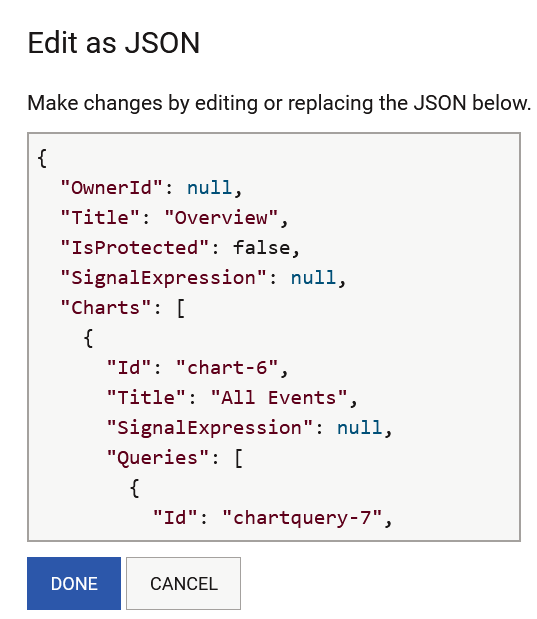
Now a dialog box opens where we can search for the Charts entry and copy everything between the []:
Create a new dashboard
We no can create a new dashboard with the + icon next to Dashboards and save it. Then we go to the Edit as JSON context menu as before. We should see something like this JSON where we need to locate the "Charts": [] property and overwrite what we copied from the other dashboard:
When we leave the dialog box with Done we must save the dashboard once more.
Conclusion
The Edit as JSON workaround is a great help to compensate the missing clone dashboard functionality. We end up with the same charts on a second dashboard and can then go on and customise the new dashboard as we need it.