RavenDB as a Sink for Serilog
As I explained in the last post, creating JSON documents with Serilog is easy. But to make something useful with the log messages we must be able to query them. When I think about storing JSON documents then RavenDB is the first system that comes to my mind.
RavenDB was the topic of many posts in this blog and is a very capable NoSQL solution to work with JSON documents. And even better, to use RavenDB with Serilog you only need another NuGet package.
This post is part of the Improve Your Log Messages series. You can find the other parts here:
- Part 1: The Missed Opportunities of Log Files
- Part 2: Structured Logging with Serilog
- Part 3: RavenDB as a Sink for Serilog
- Part 4: Seq as a Sink for Serilog
- Part 5: How to Influence the Output of Serilog
- Part 6: Monitor your Application with Seq
- Part 7: Debugging With Serilog
- Part 8: Elasticsearch as a Sink for Serilog
- Part 9: Monitor your Applications with Kibana
- Part 10: Closing the Feedback Loop from Log Messages to Knowledge
- Part 11: How To Analyse IIS Log Files
- Part 12: Using Logstash to Analyse IIS Log Files with Kibana
- Part 13: Analysing Apache Log Files with Logstash and Kibana
- Part 14: How to Analyse SharePoint Log Files
Installing a Sink
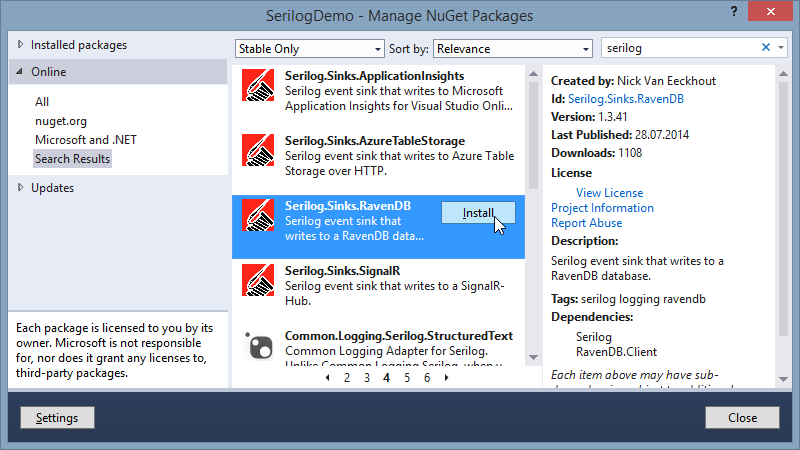
Serilog needs a special sink to write to RavenDB. We don’t need much more than installing the official NuGet package. That will not only install the sink, but will fetch all the dependencies to RavenDB.Client in one single action:
Configure the Sink
If you know RavenDB then the configuration is straightforward. All you need is a document store that points to your database and an additional line in your call to LoggerConfiguration. Don’t forget to initialize your document store, otherwise you only log to the console or create an error...
All this code only modifies the configuration of your Logger-object to use RavenDB. The rest of your application can stay the same and doesn’t need to be modified. Serilog will write your log messages from now on to the specified RavenDB database:

Search your Messages
The documents representing your log messages are now in RavenDB and can be processed like every other JSON document. RavenDB doesn’t care if they are from Serilog or if you created them on your own.
As always you can use an index or a dynamic query to search for a specific message or collection of related messages. When you want to get all the messages created while order 123 was processed you can use this query:

Next
RavenDB is a great step forward to query your log messages. However, RavenDB is a general purpose NoSQL solution that has no particular knowledge of log messages. Therefore you need to write all the queries on your own. You can analyse them in every way you want, but even for the simplest task you need to put some effort into it.
Next time we will look at Seq. This system is built for analysing log messages and offers you some pre-defined queries.