When we want to connect from the host system to an API inside a Docker container, we can map the port with
the -p option and then access it through localhost. So far, so good. But what do we need to do if we want
to make the connection in the reverse direction?
As I moved to a larger SSD, I had a problem: How can I move the systems partition of Windows at the end of the SSD so that I can use the free space to extend my existing C: drive on Windows?
In Windows, we sometimes run into files or folders we can not access, even with elevated privileges. The takeown tool helps us solve this problem by letting us take ownership of those files or directories. Once we own them, we can adjust permissions or grant access as needed.
If you search for a value with an _ in the name, you learn something new about SQL Server, but end up with a result that does not match your expectation:
If we run this query, we do not get back everything with an _ in it. Instead, we get back everything. How is that possible? The _ is a placeholder that stands for any character, what gives us back every row that has any character anywhere in the column we search for. That is most likely not what we try to do.
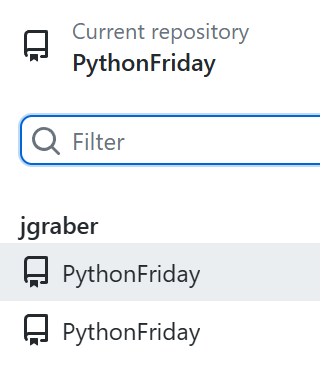
If you have two repositories with the same name in GitHub Desktop, you have a hard time to figure out which one is which:
This can happen when we need to work on a fork of the project and the original one at the same time or when we have a backup in a different folder where we need to check something but do not want to do the work in our main repository.
There is an interesting pattern that you can find in many projects, that usually starts with a good idea and turns into a dump in no time: the core folder. You start with an application and think about the core business, the important stuff. So, you go on and create a core folder. Here is now the place for the important stuff, right? No. Here is the start of your mess that from now on only grows.
There is an annoying bug in the Windows 11 Installer that catches me way too often. If you select something different than the pre-selected values in the first screen for the language options, the installer starts but then stays forever at this progress level:
Many developers use GitHub to share their code. It is convenient, offers a lot of features and works without any noticeable problems for years. Did you ever thought on creating a backup for your repositories?
Git helps us to ignore that task a bit. With every git clone we create a full copy of the whole repository, what by all means is a backup. Why should we then do some extra work to get another backup?
It is true that Git creates a copy. But do you have a current copy of all your repositories on GitHub somewhere easy to find? Not only the few repositories you worked on in the last month, but everything you have on GitHub up to its newest commit. Probably not.
Last week we saw how much code we can get rid of when we use the [init keyword to create immutable objects]. The only downside we found was that we cannot enforce that all properties get a value. To solve this problem, we can use the required keyword of C# 11:
The required modifier indicates that the field or property it is applied to must be initialized by an object initializer. Any expression that initializes a new instance of the type must initialize all required members. – from learn.microsoft.com
With C# 9 we got the new init keyword. You may have heard of it when it was introduced, but probably not used it much at the time. Then as with so many new things in the C# language, the new syntax did not offer new functionality but syntactic sugar to get the same results faster. Why should we care now? Because in combination with other newer features in C# that init keyword is a great help.
What was the init keyword again?
The init keyword defines an accessor method in a property or indexer. An init-only setter assigns a value to the property or the indexer element only during object construction. An init enforces immutability, so that once the object is initialized, it can't be changed. – from learn.microsoft.com