Skip to content

Blog

How to Fix the Context Menu of Windows 11

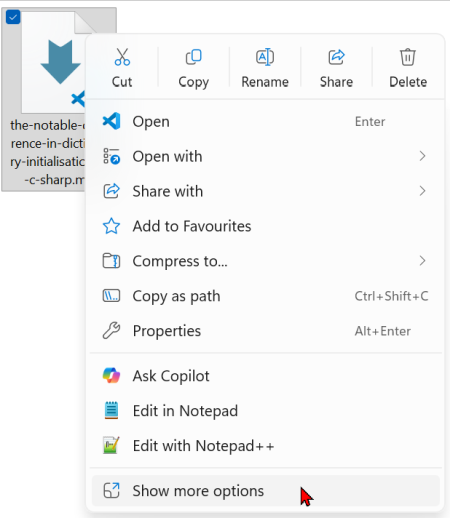
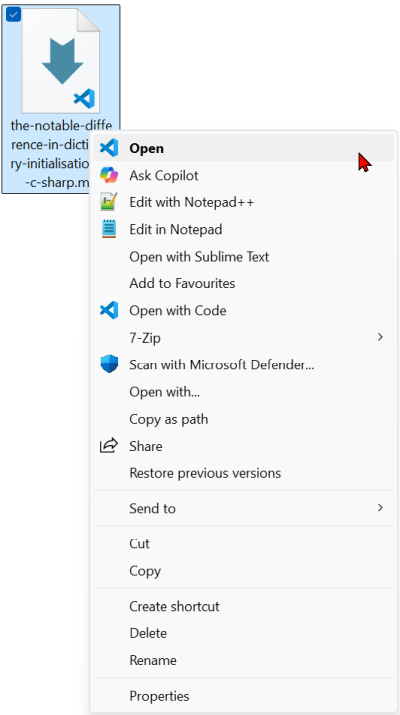
With Windows 11 came a new context menu in the file explorer. What before was a one click action, now takes us two steps:

  1. We right-click on the file to open the first context menu: The new context menu shows up.
  2. Now we need to click on "Show more options" to get the Windows 10 context menu: The old context menu with the helpful options.

So far, I accepted this extra step as the price to get all the other Windows 11 benefits. But as it turns out, this is unnecessary. We can get the old context menu back with a single entry in the registry.

Create Sortable GUIDs With UUID Version 7 in .NET

GUIDs are great for generating unique identifiers across distributed systems, since they need no centralised coordination and are globally unique. But their randomness comes with a price tag when we use them in relational databases: fragmented indexes, slower inserts, and no sense of order.

Since .NET 9 we get an out of the box solution that fixes this problem: UUID version 7. We can keep the upsides of a GUID while we can get rid of the downsides - by just using a different method to create our identifiers. Let us explore how that works.

A Shorter Way for Null Guard Clauses in C

When we want to make sure that our method only accepts values that are not null, we can write guard clauses like these on top of the method:

string Combine(string address, string city, string zipCode)
{
    if(address == null)
    {
        throw new ArgumentNullException(nameof(address));
    }
    if(String.IsNullOrEmpty(city))
    {
        throw new ArgumentNullException(nameof(city));
    }
    if(String.IsNullOrWhiteSpace(zipCode))
    {
        throw new ArgumentNullException(nameof(zipCode));
    }

    // Do the work
    return $"{address} - {zipCode} {city}";
}

That works, but as you can see in this little example, this uses many more lines to check the data than it uses to do the work itself. Is there a better way to get this functionality?

Do Not Mix Test Code With Production Code

A few months back I reviewed an application. It was sad to see in how little time you could create a mess that is not only hard to work with, but that can only be changed with a lot of effort. In this post we focus on one tiny little detail that can help you as a warning sign early on: having test code directly in the production code.

Fix Permissions in Windows With takeown and icacls

In Windows, we sometimes run into files or folders we can not access, even with elevated privileges. The takeown tool helps us solve this problem by letting us take ownership of those files or directories. Once we own them, we can adjust permissions or grant access as needed.

The basic command looks like this:

takeown /f <filename or directory>